Quin Camoufox · Local API
Drive Quin from your own code.
A loopback HTTP API on your computer. Manage profiles, open browsers, run Quin's 50 browser actions, start workflows and follow jobs from Python, TypeScript, the command line or any HTTP client.
- 01Your scriptPython · TypeScript · CLI · curl
- 02Local API127.0.0.1:50380 · scoped token
- 03Quin Camoufoxprofile, proxy, writer lease
- 04Camoufox browsera real Firefox-based session
01A first script
From a token to a real page.
from quin_camoufox import QuinClient

client = QuinClient.from_local_config()   # discovery file + QUIN_API_TOKEN
profiles = client.profiles.list(page_size=10)["items"]

with client.browsers.open(profile_id=profiles[0]["id"]) as session:
    session.navigate("https://example.com", wait_until="load")
    print(session.title())
    session.screenshot(full_page=True, name="example.png")
# leaving the block closes the browser; a Cloud profile is saved firstimport { QuinClient } from "@quin/camoufox-local";
const client = QuinClient.fromLocalConfig(); // discovery file + QUIN_API_TOKEN
const page = await client.profiles.list({ pageSize: 10 });
const browser = await client.browsers.open({ profileId: page.items[0].id });
try {
await browser.navigate("https://example.com", { waitUntil: "load" });
console.log(await browser.title());
} finally {
await browser.close({ sync: true }); // resolves once a Cloud profile is saved
}quin auth set-token --stdin < token.txt # stored protected by Windows (DPAPI)
quin api status
quin profiles list --kind cloud
quin browser open <profile-id> --url https://example.com
quin rpa run <workflow-id> --profile <profile-id> --waitexport QUIN_API_TOKEN=qlk_... # Settings → Local API → Generate token
curl -sS http://127.0.0.1:50380/api/v1/status \
-H "Authorization: Bearer $QUIN_API_TOKEN"
curl -sS "http://127.0.0.1:50380/api/v1/profiles?page=1&page_size=10" \
-H "Authorization: Bearer $QUIN_API_TOKEN"- 01Reads the discovery file and your token
- 02Lists your profiles
- 03Opens a real Camoufox browser for one of them
- 04Navigates and waits for the page to load
- 05Leaving the block closes the browser — a Cloud profile is saved first
Recorded in the app
Drive a profile from a script
A Local API token with only the permissions it needs, a Python script using the SDK, and the browser it controls.
02Security model
Built to stay on your computer.
Built for automation on your own computer, with defaults that keep it local.
- Off by default, loopback only
- You switch it on in Settings. It listens on 127.0.0.1 and refuses requests from other hosts and web pages.
- Scoped tokens
- Tokens are shown once, stored as hashes, carry only the scopes you choose, expire and can be revoked.
- Profiles and browsers
- List, create and open profiles, including Cloud profiles; close a browser and Quin saves Cloud profiles.
- 50 browser actions
- Navigate, click, type, read text, wait, screenshot, download, run in iframes and more — the same actions RPA Plus uses.
- Jobs and events
- Long operations return jobs you can poll or cancel; an event stream reports what happens; idempotency keys prevent duplicates.
- SDKs and CLI
- Python (quin_camoufox) and TypeScript SDKs, the quin command-line tool, and curl, PowerShell and n8n examples.
In the app
Turn it on, scope a token, start building
The Local API is off by default. Enable it in Settings, create a token with only the scopes your tool needs and, if you like, an expiry date. Tokens can be revoked at any time.
Read the docs: Authentication and scopes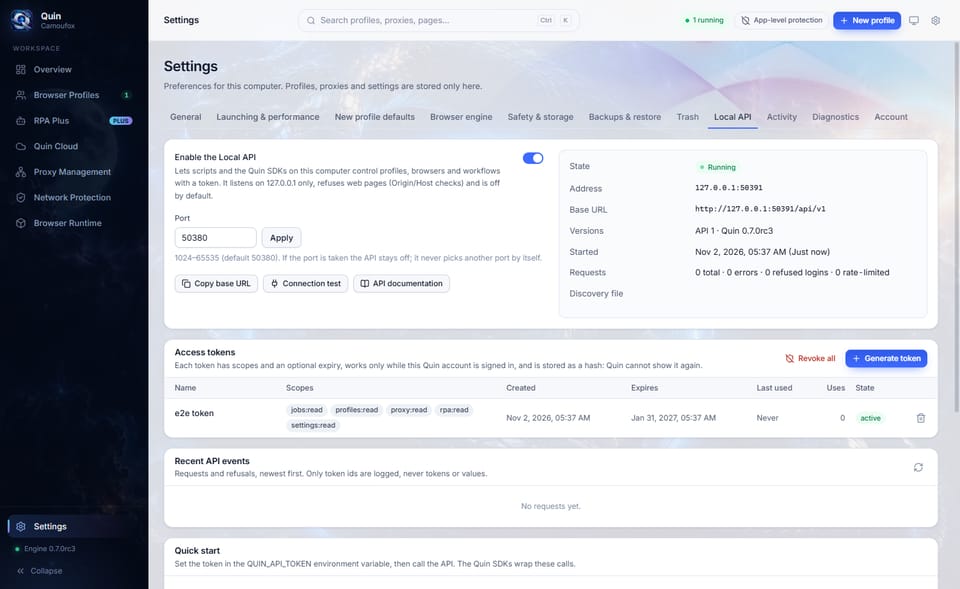
What the Local API is not
Quin uses a Firefox-based Camoufox runtime and exposes Quin's supported Local API. It does not currently provide a Chromium CDP, ChromeDriver/WebDriver, Selenium or Puppeteer endpoint, and it cannot be reached from other computers.
n8n
n8n works when it runs on the same computer as Quin (tested with n8n 2.43.7). Never expose the Local API to a network.

Follow Quin Camoufox to its stable release.
Download the Windows release candidate, check its SHA-256 and sign in with a Quin account. Accounts are created by an administrator — ask by e-mail (see Contact).